There's more to do before you ask 'Are you sure?'
Let's say I'm merging two duplicate customers inside a CMS. Putting an Are you sure? modal in front of me straight away doesn't really help because I haven't worked out what I'm confirming yet.
The records might clearly be the same person, but one has their current phone number and the other has the right email address, or maybe both have a different postal address. I need a proper merge screen that puts both customers in front of me and lets me choose which value we are keeping for every field that conflicts, otherwise the product is making those decisions for me and throwing the other data away.
Then I need to see the final customer those choices create. Once I've picked the phone number, email address and everything else that should survive, show me the one merged record so I can check it properly. After that, an Are you sure? still makes sense because the merge is removing data, but by then I actually know what I'm saying yes to.
So before I add the confirmation, I'd check what the person still needs to do. Do they need to choose which phone number survives, check the finished record or try the workflow with real data? Deal with that first, then ask them to confirm whatever they can't easily take back.
Let me sort out the record first
If the two records already have the same name or email address, that row can stay quiet. The bits I really need help with are the conflicts, so if there are two phone numbers, put them next to each other, let me pick one and show that choice in the merged customer straight away.
And this can't stop at the easy fields we happen to use in the visual. A real customer record might have addresses, account details, notes, tags or other data attached to it, and if any of that can change or disappear during the merge then I need to see it and decide what happens to it first.
Merge duplicate customers
Choose the details the merged customer should keep.
The merged customer is Adam Marsden. Customer B's phone number, 07700 900 684, is selected to survive. Customer A's phone number, 07700 900 241, will be removed.
The example here only needs a few fields to make the point, but a real merge can't stop there. If a value might change or disappear, it needs to be in that merge screen.
Only then is the confirmation useful. I've made the choices, I've checked the one customer record we're about to create and I can see what will be removed. The modal is just the last pause before I commit it.
A workflow needs something different
A workflow is a bit different because there isn't one final customer record you can assemble on screen. It can look completely fine in the editor and still message the wrong customer, miss an exception or take the wrong branch when real data hits it, so showing me the same list of steps again isn't going to tell me much.
Shopify Flow is Shopify's tool for setting up automations. A shop might use it to check an order for fraud and decide what should happen next. Before that workflow is switched on, you can take an order that already exists in the shop and run it through as a test. Shopify shows which route the order would take, but it doesn't send the notification or change anything in the live shop.
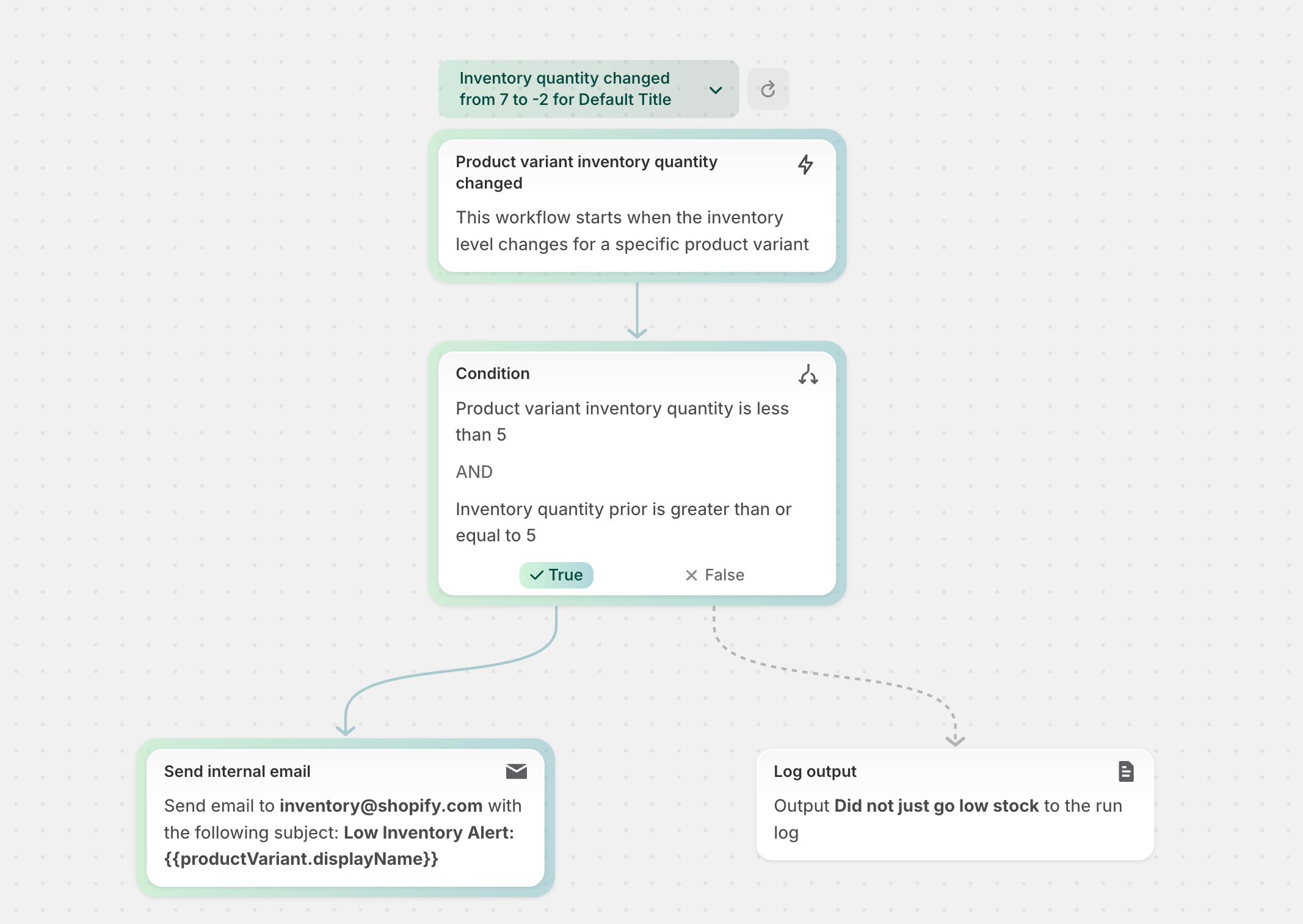
Shopify can also find a couple of existing orders to test for you, including one that should go down a particular route and one that shouldn't. You can check the orders it picked, change them if they aren't useful and run the workflow again. So instead of staring at the same boxes in the editor and hoping the logic is right, you get to see what the workflow would actually do with the sort of data it will receive.
That still doesn't mean the green tick is enough. I'd want to know that the awkward orders and customers are in those tests too, because if it has only picked tidy examples that follow the obvious route then I still don't know what will happen when the real exceptions turn up.
For one clearly named item, I probably don't need any of that. Show me what else will disappear with it and ask me to confirm. If undo genuinely brings everything back, I might not need the interruption at all.
So next time I see an Are you sure?, I'd leave the copy alone for a minute and look at what happens before it. If the person still needs to pick a phone number, check the merged customer or try the workflow with a real order, let them do that first, then use the modal to show exactly what they're about to do and give them one last chance to stop.